
Ofsted early warning and DfE compliance, for every school in your trust.
Trust Hub shows the central team which schools need attention, checks every school website against the DfE’s publishing requirements every night, and emails you when a visit to any school’s website looks like an inspector reading it before an inspection.
Hear when an inspector may be reading a school’s website
Before an inspection, inspectors read the school’s website: safeguarding, SEND, pupil premium, policies, governance. Realsmart watches for visits that follow that pattern on every school website in your trust.
We watch the website
Every page view and document opened is sorted into the areas inspectors check, such as safeguarding, SEND, premiums, governance and policies.
We check the visit
A visit that crosses the threshold is checked by AI before anyone is emailed, so routine traffic and search engines don’t set it off.
We email the school
Up to five people at the school get an Ofsted website alert, chosen on the website’s dashboard.
We email the trust
The trust chooses up to five people in Trust Hub, for all its schools or chosen ones, including groups of schools within the trust.
It’s an early warning, not a prediction or a guarantee. Inspectors usually phone the day before an inspection, and an alert can give you a little longer to check what they’re reading. Trust Hub also flags schools that may be in their inspection window, using Ofsted’s own inspection dates.
Every school website checked against the DfE, every night
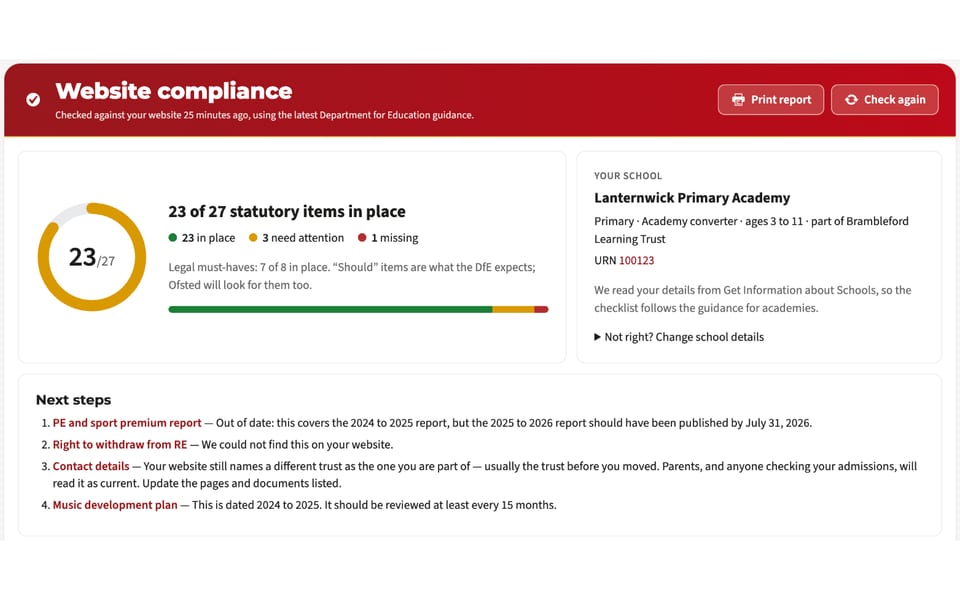
Each Realsmart school website works out what kind of school it is from the DfE’s own records, then checks itself against what that type of school must and should publish. The trust website is checked against the requirements for trusts. Nobody has to set it up.
The full publishing list
- Statutory policies, from safeguarding and behaviour to allergy safety and mobile phones
- Admissions, curriculum, results and the Ofsted report
- Pupil premium and PE and sport premium reports
- SEN information, accessibility and equality
- Governance and financial information, including trust-level items
We read the documents
- Pages, menus, policies and linked PDF and Word files
- Google Drive and OneDrive policy folders
- Each requirement shows the document and the words it came from
- Documents that cover last year, and deadlines coming up, are flagged
- A previous trust’s name still on a page is found for you
A clear list to work through
- A score on every school’s dashboard, with the must-haves first
- A template to create any page that’s missing
- A printable report and a governors’ summary
- A plain-English reading age for pages and documents
- Re-checked shortly after every edit
One dashboard for the central team
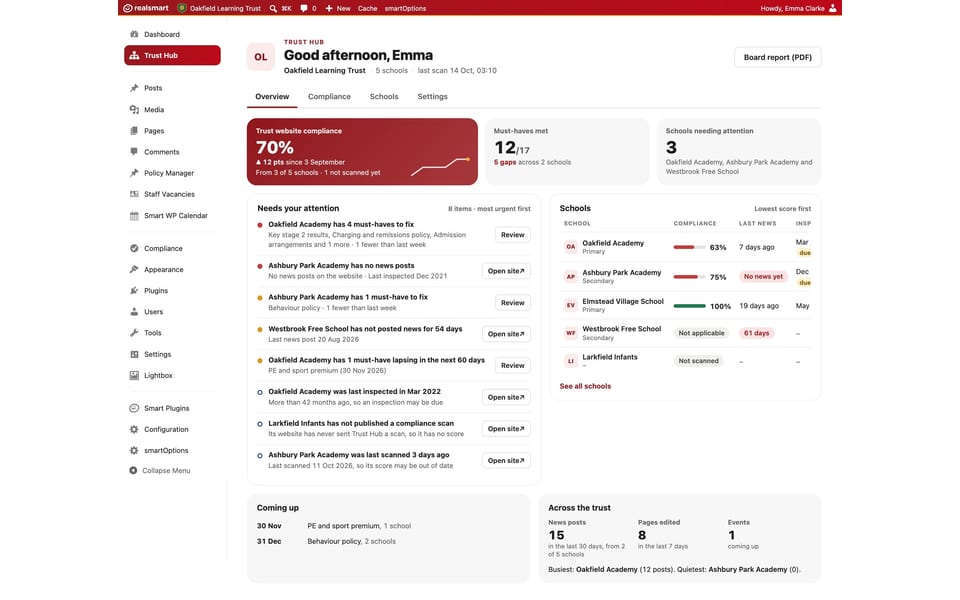
Trust Hub lives on your trust’s own website. Trust admins sign in once and see every school.
Which schools need attention, and why
- A compliance grid of every school against what the DfE expects, with the detail one click away
- Each school’s last inspection, and a flag when one may be due
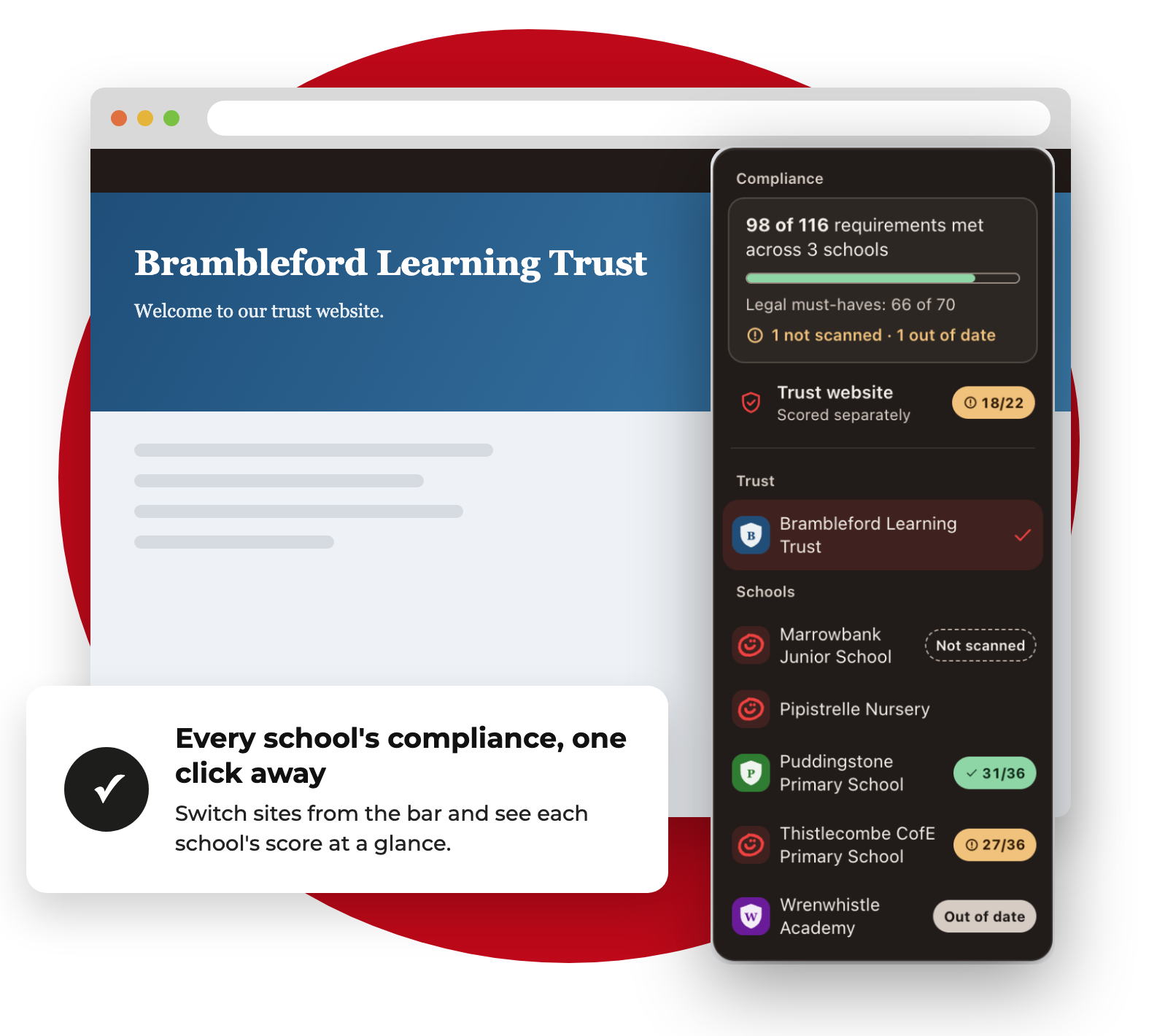
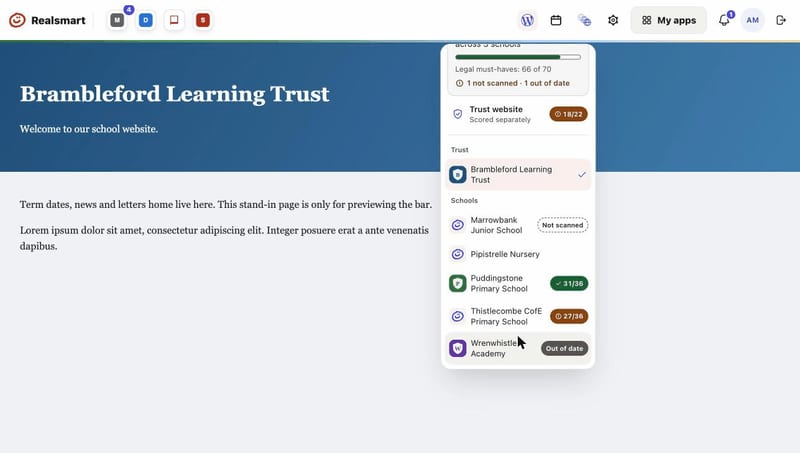
- Every school’s score in the switcher at the top of any trust website
- A CSV export for your own tracking
Ready for the board, every week
- A one-page board report for trustees, as a PDF
- A Monday briefing email with what changed and what needs doing
- Ofsted alerts sent to the people the trust chooses
- Alerts to every school website, including countdowns and emergency pop-ups
Security settings that help you meet the DfE’s cyber security standards
The same Realsmart sign-in covers your schools’ websites, Google, Microsoft and the apps on the Launchpad, so the protections below apply everywhere people sign in through Realsmart.
Set once for every school
- Two-factor sign-in for every admin, at every school, with no exemptions
- 2FA defaults for staff and students, set once in MAT overview
- Admin permissions you choose, person by person
- Sign-ins and admin changes logged
Switch on what each school needs
- The DfE cyber security password standard, with staff passwords checked against known breaches
- Passphrases allowed, so passwords can be long and memorable
- Session limits and sign-out after a period of doing nothing
- An acceptable use policy at sign-in, with a report of who has accepted it
Fewer accounts left open
- Accounts follow the MIS, so leavers are suspended and taken out of their groups
- Holiday pauses switch pupils’ sign-in off for the school holidays
- A warning before people follow a sign-in link to an outside website
- Lockout after repeated failed sign-ins
Before you book a demo
Do our schools need Realsmart websites?
The website checks and Ofsted website alerts run on Realsmart school websites. If some of your schools are with another provider, Trust Hub shows them as not yet checked, and we can talk about moving them across.
Does a good score mean we’re compliant?
No tool can sign off compliance for you. The score tells you what we found on the website and where, and what’s missing, so your team can check and fix it quickly. Always check the DfE’s guidance before you rely on it.
Can you tell us when Ofsted is coming?
No. An Ofsted website alert means a visit looked like an inspector reading the website. It’s an early warning, not a confirmation, and inspectors usually phone the day before.
Who sees Trust Hub?
Trust admins, signed in on the trust’s own website. School admins see their own school’s compliance on their website’s dashboard.
What does it cost?
It depends on how many schools are in your trust and what you use. Book a demo and we’ll talk through the cost for your trust.
See your own trust in Trust Hub
Book a demo and we’ll show you Trust Hub, the nightly compliance checks and Ofsted website alerts the way they would work for your schools.
Call us on 01302 361132 or email realsmart@realsmart.co.uk. Already with us and need help? Email support@realsmart.co.uk.