
This website uses cookies to ensure you get the best experience on our website.

View our Cookie Policy
Got it!
realsmart Logo
  • About us
    • Welcome from our CEO
    • Meet the Team
    • Partners
  • Our Products
    • School Websites
    • Primary School Websites
    • Secondary School Websites
    • School MAT Websites
    • MIS to Google Sync
    • Microsoft Active Directory Sync
    • Apple School Manager Sync
    • Smaps – Connect your learning
    • QR Code Login
    • MAT Features
    • Google Workspace Upgrades
    • Professional School Photography Service
  • Support
  • Our Blog
  • Get in touch
  • Sign in
realsmart Logo
  • About us
    • Welcome from our CEO
    • Meet the Team
    • Partners
  • Our Products
    • School Websites
    • Primary School Websites
    • Secondary School Websites
    • School MAT Websites
    • MIS to Google Sync
    • Microsoft Active Directory Sync
    • Apple School Manager Sync
    • Smaps – Connect your learning
    • QR Code Login
    • MAT Features
    • Google Workspace Upgrades
    • Professional School Photography Service
  • Support
  • Our Blog
  • Get in touch
  • Sign in
realsmart Logo
  • About us
    • Welcome from our CEO
    • Meet the Team
    • Partners
  • Our Products
    • School Websites
    • Primary School Websites
    • Secondary School Websites
    • School MAT Websites
    • MIS to Google Sync
    • Microsoft Active Directory Sync
    • Apple School Manager Sync
    • Smaps – Connect your learning
    • QR Code Login
    • MAT Features
    • Google Workspace Upgrades
    • Professional School Photography Service
  • Support
  • Our Blog
  • Get in touch
  • Sign in

Archive

Automatically sync Parents and Guardians to Google Classroom

Adding parents and guardians to google Classroom can be a time consuming and complicated process. Realsmart can seamlessly sync your parents or guardians contact details directly from your MIS.

Before starting the setup process contact realsmart support team to ensure the correct APIs are in place.

The Google Guardian feature connects parents and guardians to students Classroom information.
Because guardians are not members of the student’s School domain they must receive an invitation using their own email address. After they accept the invitation they become Classroom guardian.

Once you have synced your Guardians to realsmart you can then review them and select which to sync to google as there may be some that have requested NOT to be synced
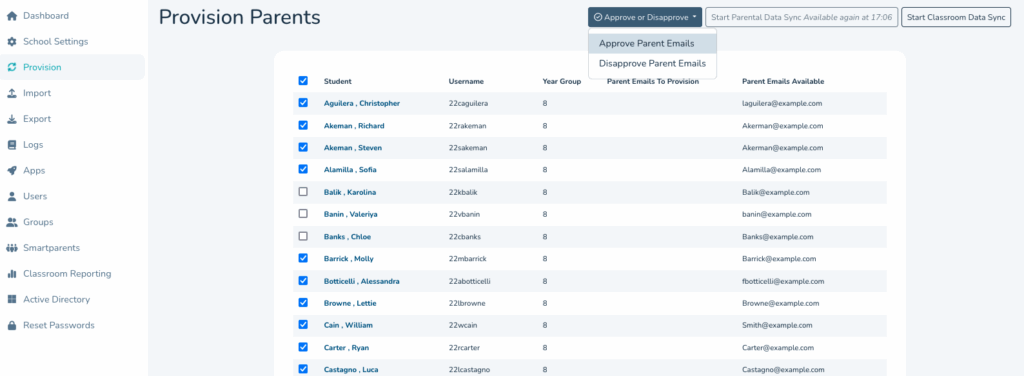
Once approved you’ll see the addresses move from ‘Parent Emails Available’ to ‘Parent Emails to Provision’ lists.

If you want to remove a parent in the future just tick and use the ‘Disapprove Parents Emails’ button.
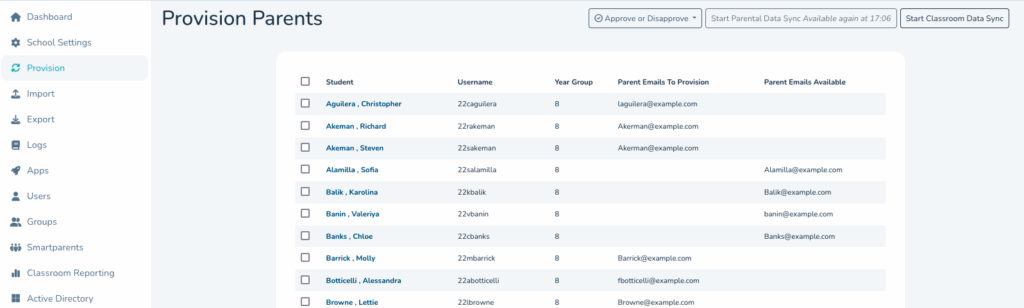
Once you are happy that the ‘Parent Emails to Provision’ list is complete hit the ‘Start Classroom Data Sync’ Button which will start the sync to google.

Within 24hrs parents will recieve an automated email invitation from google, as below. The parent or guardian just needs to hit ‘Accept Invite’
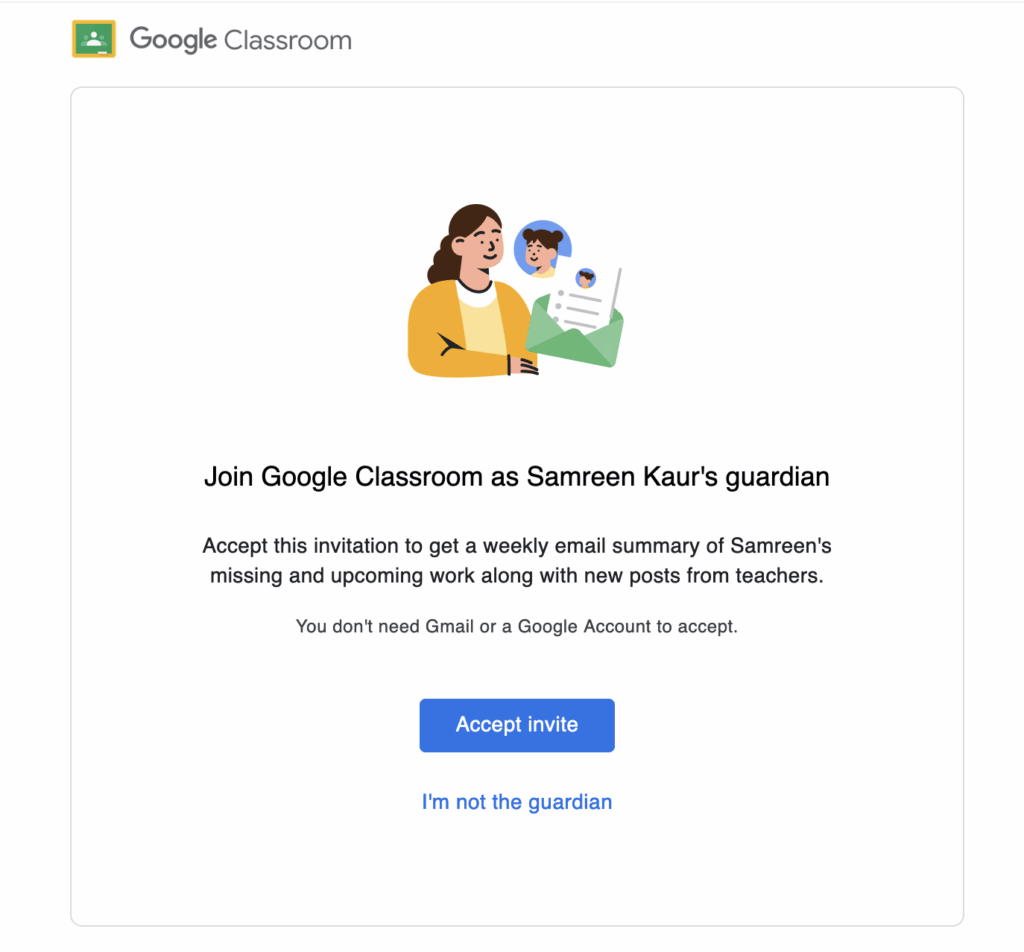
Only once they have accepted the invitation will they become a Google Guardian.

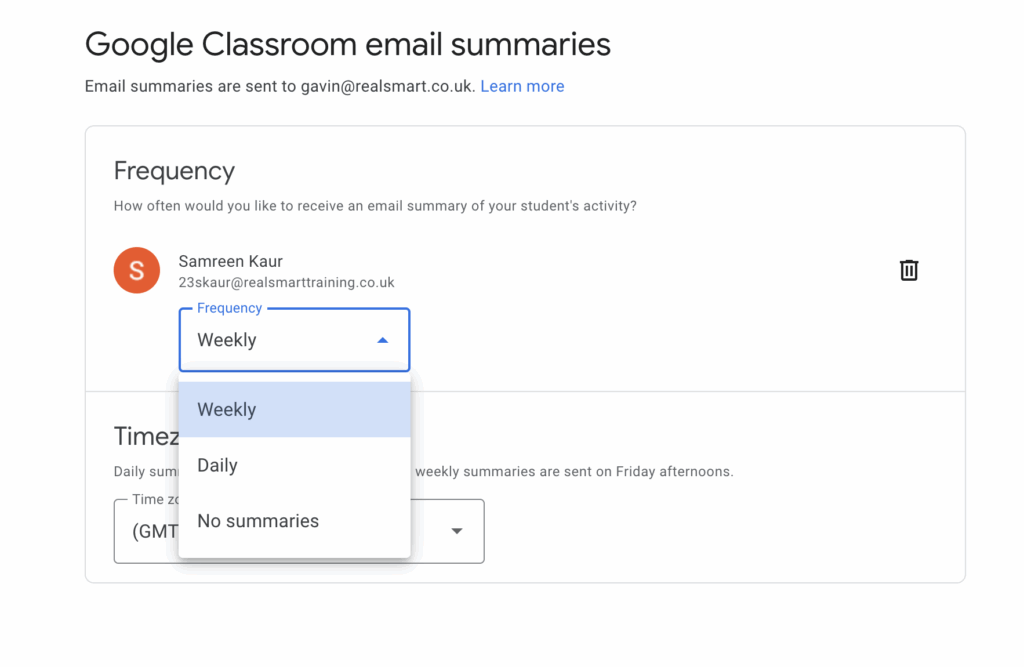
The parent will then get the option for how regularly they want to receive summaries or non at all.
Contact realsmart support if you need any help setting up your guardians to Google Classroom sync.

Our Blog, School Resources, sync news, website news

Useful Links

  • Support Guides
  • Our Services
  • Login Page
  • Privacy Policy
  • Smaps – Connect your learning
  • Google Sync for Schools
  • Active Directory Sync
  • Primary School Websites
  • Secondary School Websites
  • Trust Websites
  • Specialist Websites
  • Social Value

Contact Us

Sales - realsmart@realsmart.co.uk

Support - support@realsmart.co.uk

Telephone - 01302 361132

Information

  • Support Guides
  • Our Services
  • Login Page
  • Privacy Policy
  • Smaps – Connect your learning
  • Google Sync for Schools
  • Active Directory Sync
  • Primary School Websites
  • Secondary School Websites
  • Trust Websites
  • Specialist Websites
  • Social Value
  • Facebook
  • Linkedin
  • Instagram

realsmart.co.uk uses icons from the Font Awesome library under the PRO licence

School website powered by Realsmart Logo