
This website uses cookies to ensure you get the best experience on our website.

View our Cookie Policy
Got it!
realsmart Logo
  • About us
    • Welcome from our CEO
    • Meet the Team
    • Partners
  • Our Products
    • School Websites
    • Primary School Websites
    • Secondary School Websites
    • School MAT Websites
    • MIS to Google Sync
    • Microsoft Active Directory Sync
    • Apple School Manager Sync
    • Smaps – Connect your learning
    • QR Code Login
    • MAT Features
    • Google Workspace Upgrades
    • Professional School Photography Service
  • Support
  • Our Blog
  • Get in touch
  • Sign in
realsmart Logo
  • About us
    • Welcome from our CEO
    • Meet the Team
    • Partners
  • Our Products
    • School Websites
    • Primary School Websites
    • Secondary School Websites
    • School MAT Websites
    • MIS to Google Sync
    • Microsoft Active Directory Sync
    • Apple School Manager Sync
    • Smaps – Connect your learning
    • QR Code Login
    • MAT Features
    • Google Workspace Upgrades
    • Professional School Photography Service
  • Support
  • Our Blog
  • Get in touch
  • Sign in
realsmart Logo
  • About us
    • Welcome from our CEO
    • Meet the Team
    • Partners
  • Our Products
    • School Websites
    • Primary School Websites
    • Secondary School Websites
    • School MAT Websites
    • MIS to Google Sync
    • Microsoft Active Directory Sync
    • Apple School Manager Sync
    • Smaps – Connect your learning
    • QR Code Login
    • MAT Features
    • Google Workspace Upgrades
    • Professional School Photography Service
  • Support
  • Our Blog
  • Get in touch
  • Sign in

Archive

Security Update

Schools are under increasing pressure from both phishing campaigns and the growing threat of data leaks. This is happening because attackers are using stolen or leaked credentials, cookies, and tokens to bypass security controls. We have seen an increase in attempted attacks over the past months so here is how to implement pro-active security measures to protect your realsmart users accounts and data.

How to defend against these threats

  • Implement multi-factor authentication (MFA): MFA is a critical defence against attackers logging into your account and accessing sensitive data.
    School Admins can now force staff to use MFA either on a user by user basis or select all staff. Simply select users and select Enable 2FA from Password Bulk Actions. We recommend Google Authenticator (or use an Authenticator app that you are already using)

    This realsmart article explains how your admins can implement MFA
    https://help.realsmart.co.uk/help/mfa-admin-guide

    This article will help your staff set up MFA
    https://help.realsmart.co.uk/help/2fa-user-guide
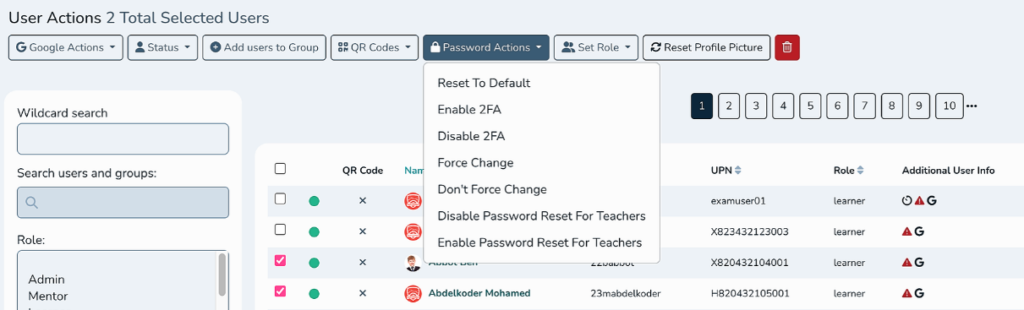
select users and use the bulk action to enable MFA

  • Educate users: Train your staff to be cautious of phishing attempts and to report suspicious activity immediately.
  • Ensure your password is not a default. Adopting the ‘three random words’ technique can help users to use suitably complex passphrases that they can actually remember.
  • Adopt a password policy for your users, where they must use complex passwords and a password expiry duration prompts user to update their password.

    This article explains the realsmart password options and settings
    https://help.realsmart.co.uk/help/password-settings
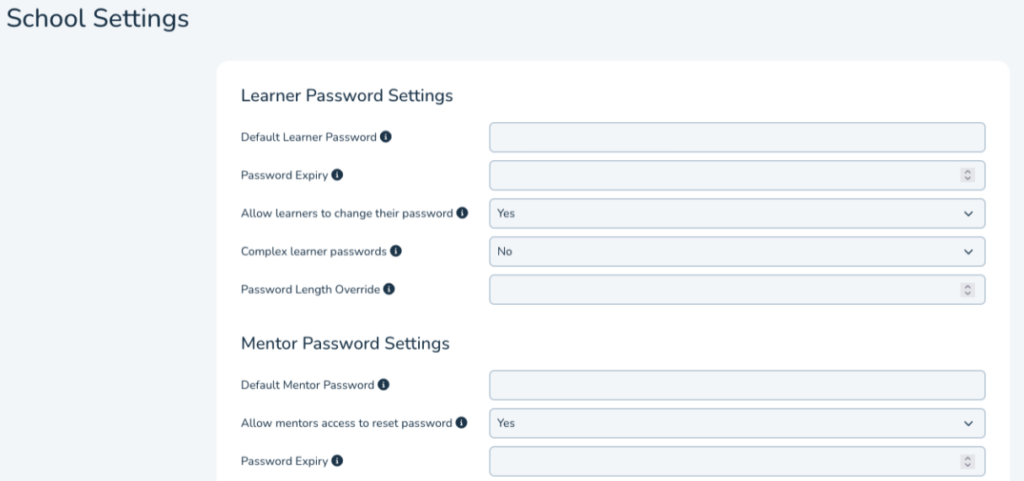
set your users password settings in realsmart admin


What Realsmart are doing to ensure you are more protected

  • Realsmart is taking a pro-active approach to ensure that you have the tools to protect your users and data
  • Admin users can now be managed in an Admin OU in your Google Workspace Environment
  • All users in the Admin OU can easily be prompted to enable Google’s multi-factor authentication via google 2FA settings

Our Commitment

We value your trust and are committed to maintaining the security of your users data.

Our Blog, website news

Useful Links

  • Support Guides
  • Our Services
  • Login Page
  • Privacy Policy
  • Smaps – Connect your learning
  • Google Sync for Schools
  • Active Directory Sync
  • Primary School Websites
  • Secondary School Websites
  • Trust Websites
  • Specialist Websites
  • Social Value

Contact Us

Sales - realsmart@realsmart.co.uk

Support - support@realsmart.co.uk

Telephone - 01302 361132

Information

  • Support Guides
  • Our Services
  • Login Page
  • Privacy Policy
  • Smaps – Connect your learning
  • Google Sync for Schools
  • Active Directory Sync
  • Primary School Websites
  • Secondary School Websites
  • Trust Websites
  • Specialist Websites
  • Social Value
  • Facebook
  • Linkedin
  • Instagram

realsmart.co.uk uses icons from the Font Awesome library under the PRO licence

School website powered by Realsmart Logo