Managing a school’s digital environment is no small feat. Thousands of students and staff rely on Google Workspace for Education daily. IT administrators must apply the right safety policies and app permissions to the right people. They need to do this without spending hours on manual data entry. To do this successfully, it’s important to Align Google Workspace with your school’s unique DNA and existing IT systems.
That is why we proudly announce our new Custom Google OU (Organisational Unit) feature! Moreover, this feature will help you align Google Workspace with your school’s existing IT systems and unique DNA.
You can now easily differentiate YouTube access between Key Stage 3 and Key Stage 5. You can also apply specific Chromebook policies for staff versus students. Our latest update puts the power of granular control directly into your hands, making it easier to ensure your school’s unique DNA matches your Google Workspace and IT systems alignment.
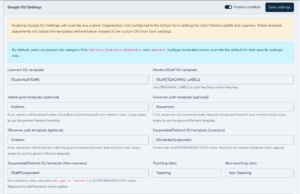
What is the Custom Google OU Feature?
Previously, syncing users from your MIS to Google Workspace streamlined account creation. Now, we are taking our School MIS Sync services to the next level. By the way, you can align Google Workspace more closely with your school’s unique DNA and existing IT systems thanks to these improvements.
Administrators can automatically map specific groups or roles from your MIS. These map directly into custom Organisational Units (OUs) within Google Workspace. Do you add or move a student in your MIS? Our sync instantly places them into the correct Google OU. They will automatically inherit the specific policies you set for that unit, ensuring that Google Workspace fits your school’s unique DNA and integrates smoothly with your existing IT systems.
Why This is a Game-Changer for Your School
1. Ultimate Safeguarding and Policy Control Not all users need the same access. You might want to restrict certain apps for Year 7s. At the same time, you can keep them open for Year 13s and staff. Automating your custom OUs lets you apply tailored security settings precisely where they belong. This transition truly aligns Google Workspace policies with your school’s unique DNA as well as existing IT systems.
2. Zero Manual Intervention Say goodbye to manual tasks in the Google Admin Console. You no longer need to drag and drop users into different OUs every term. Our automated School MIS Sync services read your live MIS data. The system does the heavy lifting for you multiple times a day. In short, you can seamlessly align Google Workspace with your school’s unique DNA and existing IT systems.
3. Accurate, Real-Time Updates Students frequently change classes, move year groups, or leave the school. Your MIS immediately registers these changes. Our sync spots the update and instantly adjusts their OU status in Google Workspace. This ensures your digital safeguarding remains 100% accurate and up to date. Furthermore, Google Workspace stays aligned with both your school’s unique DNA and any existing IT systems you already have in place.
How to Get Started
Are you an existing realsmart customer using our MIS to Google Sync? You can start using Custom OUs right now, and align Google Workspace with your school’s unique DNA and existing IT systems from the start.
We created a comprehensive guide to configure custom mappings in your admin dashboard. Check out the full documentation here: How to Set Up Custom Google OUs. This resource will ensure Google Workspace is aligned with your school’s unique DNA and fully integrates with existing IT systems.
Not Using realsmart Yet?
Many schools still manually provision Google accounts or struggle with clunky data exports. It is time to automate the alignment between Google Workspace, your school’s unique DNA, and your existing IT systems.
Our industry-leading School MIS Sync services integrate seamlessly with major MIS platforms. These include SIMS, Bromcom, Arbor, and more. The system automatically provisions users, Google Classrooms, timetables, and Custom OUs. We save IT teams hundreds of hours every single year. Your school’s data remains secure and perfectly organised, all while keeping Google Workspace in harmony with your school’s unique DNA and existing IT systems.
Click here to book a free demo to see how we can transform your IT management today while making sure Google Workspace aligns with your school’s unique DNA and existing IT systems.